Anatomy of a Fireballing
This blog does OK. I get a couple of hundred visits a day, including a steady double-digit daily amount coming from HDRsoft for my HDR posts and the occasional spike towards the thousand whenever someone new discovers the Munchy Box and passes it to their friends. However, just a couple of days ago, I was inundated with visits coming from Daring Fireball. Oh crap.
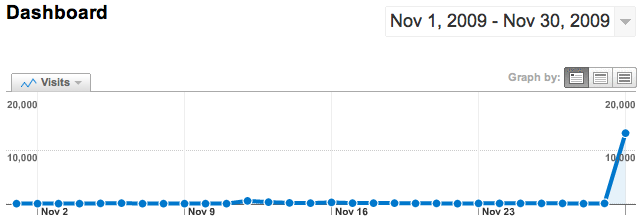
Now, this isn’t the first time I’ve had a WordPress blog spiked by a tsunami of visits: This very blog has had three major influxes of traffic from the B3ta newsletter, and the funny-named myqu.im made B3ta’s funny name corner. What I learned from these previous successes was that WordPress will fall over every time, taking MySQL out first and cascading Apache as collateral damage. While the Munchy Box post was getting around 4-5,000 visits every day for about a month, giving me plenty of time to learn how to stop my server from breaking, Daring Fireball gave me about one new visit a second, for over an hour.
jearle@cat5# sudo grep "GET /200" statistics/logs/access_log.processed | \
awk '/daring/{print $4" "$5}' | head -1
[30/Nov/2009:00:29:37 +0000]
jearle@cat5# sudo grep "GET /200" statistics/logs/access_log.processed | \
grep -c "30/Nov/2009:00"
1503
First visit at half past midnight and 1500 visits in the first half-hour after that. That’s what a site needs to be able to withstand if you get a link posted on Daring Fireball. Frankly, on a standard, average dedicated server, WordPress cannot handle that amount of traffic without help. Luckily, help is to hand in the form of Donncha O Caoimh‘s superb wp-super-cache, a WordPress plugin that creates a static cache of your site so it doesn’t need to spend over a second generating a page for each visit.
jearle@cat5# curl -s blog.23x.net/200 | tail -3 <!-- Dynamic page generated in 1.545 seconds. --> <!-- Cached page generated by WP-Super-Cache on 2009-12-03 00:14:07 --> <!-- super cache -->
To put it simply, if you’re running a WordPress blog, you need to be using wp-super-cache. One day, someone will tell people about stuff you’re saying and you want your site to still be there when the people that listen to them turn up on your doorstep. When I first set up myqu.im, I didn’t install wp-super-cache and had to hard-reset the server from the serial console to regain control when the b3tans overloaded it in 5 minutes. Don’t be as dumb as I was. This time, my CPU was 95%+ IDLE and MySQL didn’t even show in top.
Anyway, enough about that, let’s look at what Daring Fireball readers use. Thanks to Google Anal for the stats.
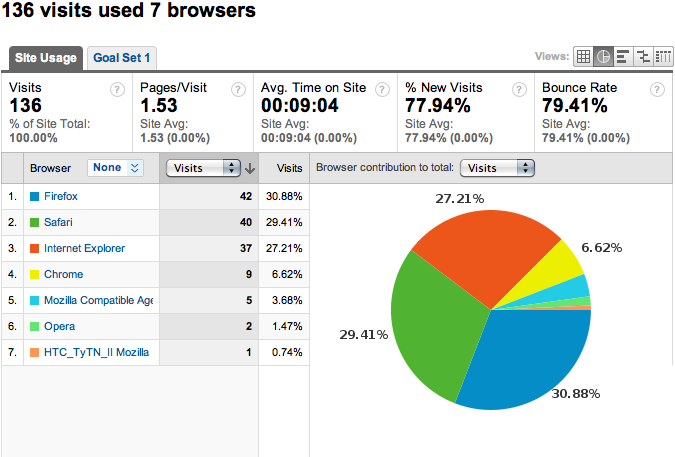
First up is the mix of browsers. Here’s a typical lazy Sunday’s stats, the day before a Fireballing. Safari beats IE, but languishes behind Firefox.
This is a pie chart of the browsers used by the 13,000 visits Daring Fireball brought me. Over half use Safari.
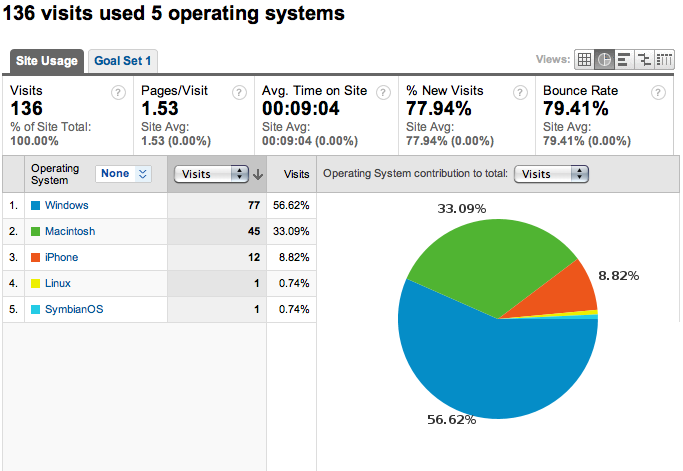
As Daring Fireball is mostly an Apple commentary site, we would expect the OS bias to fall heavily towards the fruited-ones like myself. My usual crowd uses mostly Windows, but is already 33% Mac.
Gruber’s readers are almost three-quarters Mac-based, and shockingly, even on a work-day, there are more iPhone users than Windows users.
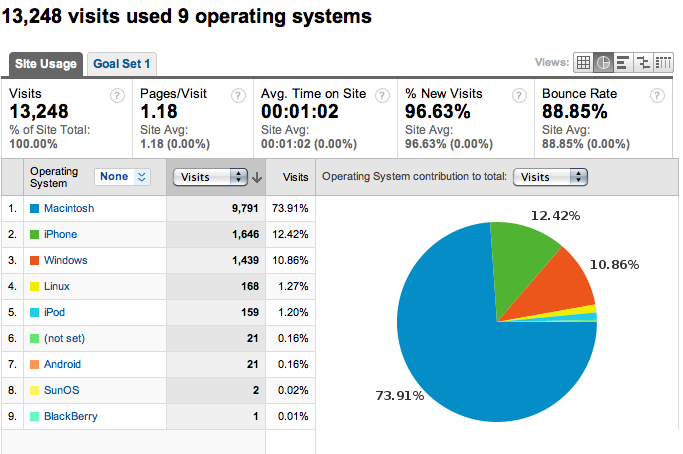
Now, let’s not forget these stats are just numbers and numbers don’t read articles, but still, more iPhones than PCs? Any questions? I’ve got the raw data here if anyone needs more info …
Trackbacks & Pingbacks
- Anatomy of a Fireballing «
Thu, 03 Dec 2009 02:07:55 +0000 - Dave Caolo - WP Super Cache
Thu, 03 Dec 2009 02:17:50 +0000 - A Blog Worth Having | Aaron Halford
Thu, 03 Dec 2009 03:28:06 +0000 - Anatomy of a Fireballing « Day and Age
Thu, 03 Dec 2009 19:58:00 +0000 - mysocialbrain: 03-12-2009 : protagonist
Thu, 03 Dec 2009 20:11:22 +0000


Thu, 03 Dec 2009 01:48:45 +0000
A better and more scalable option – if you have the required control over your server – is to place a reverse proxy such as Varnish in front of apache. The latest versions of WordPress are carefully optimised to take advantage of reverse proxies and can serve several thousand requests per second without taking up even 5% of your CPU load. And this works not just for WordPress specifically, but anything hosted on the server that serves appropriate HTTP cache or expiry headers. Druapl 7, for example, will be able to fully take advantage of this too.
Thu, 03 Dec 2009 03:55:31 +0000
>>> Google Anal
[lqtm]
Thu, 03 Dec 2009 04:03:31 +0000
I only rarely use wp-super-cache with my WP blog, and I’ve been fireballed a few times, sometimes with traffic from other big websites coming in as well. I haven’t had that much of an issue; this is of course very dependent on your normal traffic pattern and the power of your server, but I believe more recent versions of WP already do some sort of caching out of the box.
Thu, 03 Dec 2009 04:07:18 +0000
I hope you still have it running. Here you go again.
Thu, 03 Dec 2009 04:21:42 +0000
WordPress doesn’t set expires headers on the dynamic content by default. It assumes you want to load the page fresh each time. The best bet is super-cache for a basic site.
(I run a site where it’s not possible, due to the % of logged in users. We’re going to be modifying the system to use a varnish cache, but it’s not for the light hearted, at least for use w/ WP directly. )
Thu, 03 Dec 2009 04:23:23 +0000
The stats are very eye-opening – thanks for providing them!
Thu, 03 Dec 2009 04:26:30 +0000
I had to install wp-super-cache on my own WordPress blog after Hostgator shut my site for using too much CPU cycles on a shared server. It’s all good now.
Thu, 03 Dec 2009 10:14:51 +0000
That’s one hell of a spike! Glad the plugin did it’s job. It really makes a huge difference when there’s a pile of anonymous traffic.
Thu, 03 Dec 2009 10:20:21 +0000
For the vast majority of users who are on shared hosting, WP-Super-Cache is the best option.
If you’re on a VPS or a dedicated box, you have more options. I’m a big fan of using the Memcached WP object cache backend and running Batcache for output caching. It uses Memcached’s inexpensive incrementor to detect when a specific URL is getting hammered. I believe the logic is “2 hits within two minutes by anonymous users caches the page for 5 minutes.” The benefit there is that everything else stays dynamic, and your hard drive isn’t churning to update the cache every time someone leaves a comment. This also has the benefit of working on multi-web-server setups.
And if your site uses static images, or extensive JavaScript, you can try throwing nginx in front of Apache and setting it up to serve your static files directly, only passing on PHP requests to Apache. I use that on sites to get millions of daily page views (and tens of millions of “hits”) from a single box.
Anyway, thanks for using WordPress and for posting this, and congrats on the double-Fireballing!
Thu, 03 Dec 2009 14:42:55 +0000
Glad to know wp-super-cache works. I have it on all my WordPress installations but I’ve never needed it to really take this kind of hammering. It’s reassuring to know if I accidentally slip from my little niche topics my site stands a chance of surviving.
Thu, 03 Dec 2009 16:11:05 +0000
Been there, done that.
Interestingly, though, MT had no trouble keeping up with things. My DSL connection (!) was inundated with traffic, making for very slow life inside the house, but it worked remarkably well.
Here’s my description of being Fireballed:
http://www.bill.eccles.net/bills_words/2009/09/getting-fireballed-the-statist.html
Thu, 03 Dec 2009 16:24:16 +0000
@Mark Jaquith I use Media Temple for most of my sites, and interestingly enough, they recommended not using super-cache, because of how their servers are configured or something. Just throwing that out there.
Thu, 03 Dec 2009 17:14:01 +0000
So, what if your blog is at wordpress.com? Are they set up to handle fireball level of loads?
Just curious.
Thx
Thu, 03 Dec 2009 20:33:14 +0000
@pbuh +1
Thu, 03 Dec 2009 23:01:34 +0000
@Hty Blogs at WordPress.com will easily handle the traffic from Fireball, no problem at all. Site wouldn’t even notice it.
@Skirkster – do they use NFS to host their sites? That might be why they don’t recommend it.
Sun, 06 Dec 2009 18:39:50 +0000
Nice post on Wp-super-cache. I use it on my own site which handles the occasional spikes well. As soon as I take it off, my blog will essentially take down the server. Fun huh?
My question is this – why is WordPress by itself so inefficient at caching pages? It seems silly to me that a default install is so un-resiliant as to bring down a server if it gets a lot of views, which is just about everyone’s goal. It seems there should be a better caching component, with the ability to turn off for debugging, within the core WP code.
Thanks again.
Sun, 06 Dec 2009 19:16:17 +0000
I suspect it’s because of the widgets: widgets make a stupid amount of SQL calls and, if you’re not running memcached or similar, it’s SQL that fails first. What WP should do is have WP-Super-Cache as part of the default install, turned off or at a safe level.
Wed, 09 Dec 2009 04:18:53 +0000
@patlaw Thought of installing wp-super-cache? Might help till u get tt dedicated server http://bit.ly/8oYNA7
Wed, 09 Dec 2009 12:03:47 +0000
@David Chin
I’ve had that happen a few times as well after a spike. Hostgator at least help you through the process of installing supercache or something a bit meatier if that doesn’t work out.
Wed, 09 Dec 2009 23:37:06 +0000
Because it has to run on the least common denominator setup. We can’t rely on Memcached, APC, Xcache or even the filesystem. As someone mentioned above, some hosts don’t want you to use WP-Super-Cache, probably because they have a distributed filesystem and all those file writes are going to mess things up.
This is a good problem to have, but it’s not one that a lot of WordPress users ever have to worry about. It just seems like it is. You don’t notice the 10 million WordPress blogs that handle their load without breaking a sweat. You notice the ones you click to from Digg or Daring Fireball. If you look at the 80/20 thing, it’s probably not even 1 percent — forget 20 percent or 80 percent.
We are talking a lot about the idea of “canonical plugins” — plugins that are featured from with WordPress, are well-supported, secure, stay up-to-date. “Caching” is definitely one of the areas we think could benefit from a canonical caching plugin (and until then, WP-Super-Cache is probably the right choice for most people on shared hosting).
Tue, 15 Dec 2009 00:57:08 +0000
Man Goes from No Traffic to Some Traffic. WordPress Dies. http://blog.23x.net/216/anatomy-of-a-fireballing.html (Seriously, WP?)
Fri, 19 Feb 2010 00:45:58 +0000
@danwood @gruber will knock your server around pretty good. http://blog.23x.net/216/anatomy-of-a-fireballing.html
Tue, 09 Mar 2010 21:50:12 +0000
@cimota If you're on WordPress, some good advice from @jearle at http://blog.23x.net/216/anatomy-of-a-fireballing.html