Handbrake, VLC and 64 bit problems
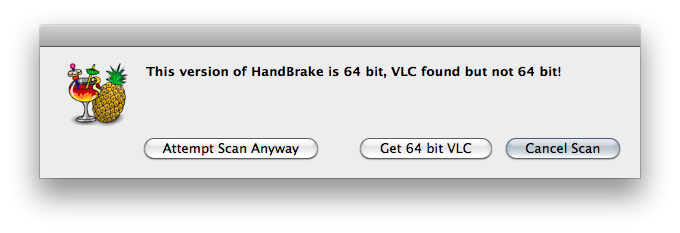
Recently, the latest version of the DVD converter Handbrake (version 0.94) was released and it added so many great features, including a performance-boosting 64-bit version. Overall, it has been getting rave reviews from the Mac press and deservedly so. However, there is an unfortunate problem that makes ripping DVDs tricky: it requires a 64-bit version of VLC to be installed, and currently VLC is 32-bit only.
So, how do we get around this problem?
Firstly, let’s clarify why this problem arises. VLC contains libdvdcss, a CSS library that allows protected DVDs to be read. Handbrake, rather than containing its own version of libdvdcss requires you to have VLC installed instead. This is a great solution and allows Handbrake to avoid a few legal issues. The problem with this arrangement is that you need both applications to be compiled for the same CPU. 64-bit Handbrake requires a 64-bit VLC with a 64-bit libdvdcss inside, and the latest version of VLC, 1.0.3, is 32-bit only. Libdvdcss is also 32-bit only as can be seen here.
jearle@blackbook# file /Applications/VLC.app/Contents/MacOS/lib/libdvdcss.2.dylib
/Applications/VLC.app/Contents/MacOS/lib/libdvdcss.2.dylib: Mach-O universal binary with 2 architectures
/Applications/VLC.app/Contents/MacOS/lib/libdvdcss.2.dylib (for architecture i386): Mach-O dynamically linked shared library i386
/Applications/VLC.app/Contents/MacOS/lib/libdvdcss.2.dylib (for architecture ppc7400): Mach-O dynamically linked shared library ppc
i386 means 32-bit, so we’re scuppered and Handbrake won’t work in 64-bit. However, there is another way. There is an application called Fairmount that mounts protected DVDs as unprotected disks and the latest version comes in 32- and 64-bit versions. It too uses VLC for libdvdcss, so you’ll need to run the 32-bit version of Fairmount to get it to work.
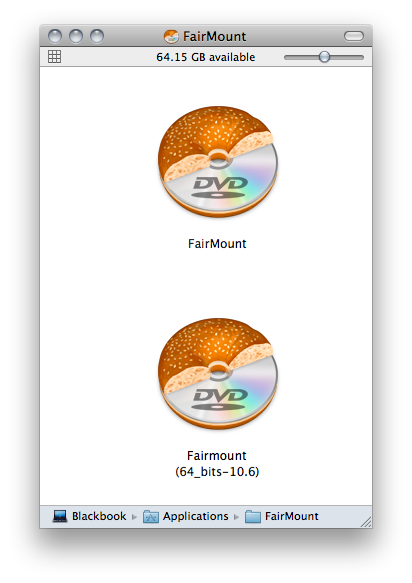
Launch the 32-bit version and it will mount the DVD and Handbrake will see it as an unprotected DVD and let you convert your disk to let you play it on whatever devices you want.
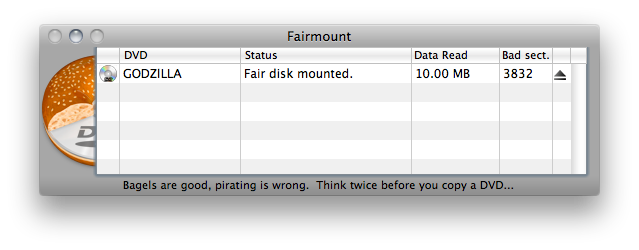
Gojira! I’ll be watching a 1954 nuclear experiment metaphor movie on my iPhone in no time flat.
Update: Yes, I am aware you could just grab the 64-bit 1.0.2 version of VLC, but it’s apparently buggy.
Trackbacks & Pingbacks
- More on Handbrake, VLC, and 64-Bit Problems «
Mon, 30 Nov 2009 02:19:18 +0000 - Handbrake 0.94 64Bit Fix | Mac Fanatic
Mon, 30 Nov 2009 14:09:04 +0000 - Monday Morning News | MacTalk Australia
Sun, 06 Dec 2009 22:45:03 +0000 - Jared Earle
Fri, 05 Feb 2010 11:47:44 +0000 - Jared Earle
Sun, 14 Feb 2010 22:39:26 +0000 - Jared Earle
Tue, 09 Mar 2010 15:14:05 +0000 - Jared Earle
Fri, 23 Apr 2010 11:23:07 +0000


Mon, 30 Nov 2009 02:10:31 +0000
Why not just install 64bit VLC and the problem is solved. I am running 1.03 RC Golden 64 bit here.
Mon, 30 Nov 2009 02:15:54 +0000
“Update: Yes, I am aware you could just grab the 64-bit 1.0.2 version of VLC, but it’s apparently buggy.”
Since I don’t use VLC except as the libdvdcss engine for Handbrake, will 1.0.2 be ok for Handbrake 64bit? (in other words, do the bugs in 1.0.2 VLC affect the decoding magic for Handbrake? )
Mon, 30 Nov 2009 02:23:24 +0000
@Se7en, if all you’re after is just libdvdcss, I’m not aware of any problems with the version of supplied in 1.0.2 64-bit, so go grab it from the link I posted above.
@Phil, If you’re happy running release candidates, that’s great. Using Fairmount is just a temporary workaround until Videolan release a proper, stable 64-bit version that you don’t need to run pre-release software for.
Mon, 30 Nov 2009 02:34:38 +0000
sweet, thanks Jared!
Mon, 30 Nov 2009 04:30:12 +0000
or you can just download a 64-bit nightly of VLC here http://nightlies.videolan.org
Its been stable and it got the job done for me in Handbrake.
Mon, 30 Nov 2009 04:39:05 +0000
I think the fact that there are “nightly” builds of VLC proves there is no such thing as a “stable” version. Users should have no qualms about using an older version or a “release candidate” (I actually chuckled while I typed that).
Mon, 30 Nov 2009 08:15:56 +0000
Or you could use a third party app like Ripit or MacTheRipper to rip the DVD to a VIDEO_TS folder and then use whatever bitness of HandBrake you like from there (since it will take those folders as inputs.)
Mon, 30 Nov 2009 09:30:25 +0000
I’m very disappointed that 64bit Handbrake (and VLC for that matter) are Intel only. What about G5 support? I have an Intel Mac but, for most things – and especially video, I’d rather use my PowerMac (because my Intel Mac is a laptop).
Mon, 30 Nov 2009 11:29:47 +0000
@ The Grouch
Power PC is dead technologie for Apple now Intel only !
They all ready gave it a good life with Leopard being compatible and it was a slow transition buying you time but let face it now you need an Intel Core 2 Duo minimum this days and for the futur too.
Mon, 30 Nov 2009 13:14:33 +0000
I’m very disappointed that 64bit Handbrake (and VLC for that matter) are Intel only. What about Macintosh SE/30 support? I have an Intel Mac but, for most things – and especially video, I’d rather use my Macintosh SE/30 (because my Intel Mac is a laptop).
Mon, 30 Nov 2009 19:10:57 +0000
Completely off topic, but ahh, Fairmount Bagels in Montreal. Tips hat to Metakine.
Mon, 30 Nov 2009 20:45:54 +0000
@The Grouch
There’s little to no benefit from a 64-bit PowerPC binary other than larger addressing. Chances are it would probably be slower than the 32-bit binary.
Tue, 01 Dec 2009 05:54:44 +0000
Handbrake, VLC and 64 bit problems | The 23x blog http://rly.cc/d6lLj
awkward but functional
Tue, 01 Dec 2009 06:13:15 +0000
The link for Fairmount is dead. On their website, it links to their other product, DVDRemaster. Must be a link error on their site. I will stick with Mac the Ripper, then use Handbrake.
Tue, 01 Dec 2009 12:32:03 +0000
@Peter, Fairmount is supplied alongside DVDRemaster. Here’s the text from their FAQ: “The reason why DVDRemaster is downloaded when downloading Fairmount is that the latter is distributed with the DVDRemaster package.”
Wed, 02 Dec 2009 13:22:29 +0000
@Peter
The DVDRemaster DMG has both DVDRemaster and Fairmount (Source and Binary) in it.
Wed, 09 Dec 2009 21:08:29 +0000
@WTL I have a feeling it has something to do with this. (i.e. no stable 64-bit build, so they've hidden it maybe?) http://bit.ly/55yHmO
Sat, 12 Dec 2009 12:19:50 +0000
"HandBrake の 64bit 版を使うには、Fairmount の 32bit 版と VLC 1.0.3 を使えばよい。" http://blog.23x.net/200/handbrake-vlc-and-64-bit-problems.html
Fri, 01 Jan 2010 00:41:30 +0000
Go buy your cheap ass a new mac
Sun, 03 Jan 2010 03:56:39 +0000
I just ripped five dvd’s using the current version of 64bit VLC and Handrake w/o a hiccup.
Sat, 27 Mar 2010 18:14:05 +0000
please tell me how you did that, i have home videos on vhs tapes, that i put onto dvd-r’s. and im trying to use handbrake but it gives me that VLC error on it. How did you do it?
Sun, 28 Mar 2010 02:10:34 +0000
The article explains it all.
Sat, 23 Jan 2010 13:49:57 +0000
Mit Fairmount lassen sich die Probleme mit Handbrake 64 bit und VLC 32 bit umgehen: http://bit.ly/7Kj3J2
Tue, 26 Jan 2010 23:33:38 +0000
Works perfect.
Wed, 27 Jan 2010 13:07:37 +0000
oh my God.. so there’s no 32-bit of vlc.. darn.. i like it more to use handbrake…
Mon, 01 Feb 2010 17:32:29 +0000
Link: Handbrake, VLC and 64 bit problems – How to get 64-bit Handbrake working with Fairmount http://icio.us/lxv3tr
Mon, 22 Mar 2010 09:43:36 +0000
Thank you very much, works like a charm!
Mon, 17 May 2010 20:35:25 +0000
Jared,
I did everything you suggested, but when I insert my DVD, Fairmount does nothing. It doesn’t automatically mount the DVD, and I can’t seem to drag it into Fairmount either. Any suggestions?
Thank you!
Sun, 30 May 2010 05:13:43 +0000
Handbrake, VLC and 64 bit problems | The 23x blog: Recently, the latest version of the DVD converter Handbrake (ve… http://bit.ly/aABbhS